Construction and infrastructure projects are among the most complex human endeavours — involving dozens of disciplines, hundreds of stakeholders, thousands of interconnected components, and timelines where coordination failures translate directly into cost overruns, safety incidents, and delayed delivery. The challenge of bringing all these elements into a coherent, navigable, analysable whole before a single physical element is built is precisely the problem that Navisworks software was built to solve.
What Navisworks Is
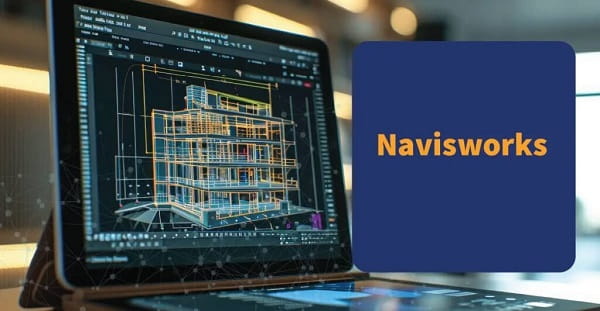
Navisworks is a project review software developed by Autodesk — the same company that produces AutoCAD, Revit, and Civil 3D. It is designed specifically for the construction, engineering, and infrastructure sectors as a coordination, clash detection, simulation, and visualisation platform that can aggregate models from multiple design disciplines and software formats into a single integrated review environment.
In plain terms, Navisworks takes 3D models created by architects, structural engineers, MEP engineers — mechanical, electrical, and plumbing — civil engineers, and other disciplines, and merges them into one unified model. This aggregated model can then be navigated, analysed for conflicts between systems, animated through construction sequences, and reviewed by all project stakeholders in a format that doesn’t require every participant to own the originating design software.
The Core Capability: Clash Detection
The single feature that has made Navisworks indispensable on large construction projects is its clash detection engine. A clash occurs when two or more building systems occupy the same physical space — a structural beam running through an air handling duct, a sprinkler pipe intersecting with a conduit run, or a plumbing stack positioned where a load-bearing column was designed.
Without digital clash detection, these conflicts are discovered during construction — at which point rectification means halting work, redesigning the affected systems, procuring different components, and potentially compromising adjacent completed work. The cost is measured in days of delay and lakhs of additional expenditure.
Navisworks identifies these clashes automatically by testing every element in every model against every other element — a calculation that would take weeks manually and takes hours or minutes digitally. The software classifies clashes by severity — hard clashes where elements physically overlap, soft clashes where elements violate clearance tolerances, and workflow clashes where construction sequencing creates access conflicts — and generates detailed reports that design teams can act on before construction begins.
4D Simulation and Construction Sequencing
Beyond clash detection, Navisworks adds a time dimension — the “4D” in construction technology terminology — to the 3D model. By linking model elements to a construction programme or schedule, Navisworks animates the construction sequence, showing how the building or infrastructure asset assembles over time.
This 4D simulation allows project managers to identify sequencing conflicts — situations where two trades are scheduled to occupy the same space simultaneously, or where a structural element cannot be installed until a prior work package is completed. Identifying these conflicts in simulation before they occur on site reduces programme risk and enables realistic scheduling that field teams can actually follow.
Key Editions: Navisworks Simulate vs. Navisworks Manage
Navisworks comes in two primary editions. Navisworks Simulate provides model aggregation, navigation, 4D simulation, and rendering capabilities. Navisworks Manage adds the full clash detection and reporting functionality — making it the standard choice for project teams where coordination and conflict resolution are the primary use case.
Both editions support import from over fifty file formats — including files from Revit, AutoCAD, ArchiCAD, Bentley, Tekla, and SketchUp — enabling coordination across design teams using different software without requiring format conversion.
Who Uses Navisworks
Navisworks is used by architects, BIM managers, structural engineers, MEP engineers, quantity surveyors, main contractors, subcontractors, and project managers across commercial, residential, industrial, healthcare, transportation, and infrastructure projects. On large complex projects — hospitals, airports, data centres, high-rise commercial towers — Navisworks coordination models are often contractually mandated under BIM Execution Plans.
Frequently Asked Questions (FAQs)
Q1. Is Navisworks part of the BIM workflow?
A: Yes. Navisworks is a central tool in Building Information Modelling workflows — specifically for the coordination and review stage where models from multiple disciplines are federated and checked for conflicts. It is not a modelling tool itself but a coordination and review platform that sits downstream of the authoring tools like Revit and AutoCAD where models are originally created.
Q2. Can Navisworks files be shared with clients or contractors who don’t own the software?
A: Autodesk provides Navisworks Freedom — a free viewer application — that allows any project stakeholder to open and navigate NWD files created in Navisworks without purchasing a licence. This makes model sharing practical on projects with large numbers of stakeholders with varying software ownership.
Q3. How long does it take to learn Navisworks at a working level?
A: Basic navigation, model federation, and clash detection can be learned to a working level within two to three days of structured practice. Advanced features including 4D simulation, clash management workflows, and rendering require more sustained learning — typically two to four weeks of regular use on a live project. Autodesk Learning provides structured courses and the software’s interface is designed for intuitive navigation.
Q4. Does Navisworks work on large complex models without performance problems?
A: Navisworks is specifically engineered for large model performance — it caches model geometry efficiently to enable smooth navigation through models containing millions of elements. Performance depends on the workstation’s RAM and graphics card capability, but Navisworks is widely considered the most performance-optimised coordination viewer for large construction models in the market.
Q5. Is Navisworks used in infrastructure projects as well as buildings?
A: Yes. Navisworks is used across roads, bridges, tunnels, rail, water treatment, and energy infrastructure projects where coordination between civil, structural, and MEP or process engineering disciplines creates the same clash and sequencing challenges as building construction. Civil 3D and Infraworks models import directly into Navisworks, making it equally applicable to horizontal infrastructure as to vertical building projects.